
Billing & Credits Guide
Lingora uses a credit system to meter AI-powered translations. This guide explains what credits are, how they are consumed, how to monitor your balance, and how subscription tiers and one-time credit bundles work.
Click-path: Sidebar > Billing
How Credits Work
Credits are Lingora's unit of account for AI translation. The key principle is simple: only the Lingora LLM engine consumes credits.
| Engine | Credit cost |
|---|---|
| Lingora LLM — single candidate | 1 credit per string |
| Lingora LLM — 3-candidate | 3 credits per string |
| DeepL (BYOK) | 0 credits |
| Google Translate (BYOK) | 0 credits |
| Lara (BYOK) | 0 credits |
| OpenAI BYOK | 0 credits |
| Anthropic BYOK | 0 credits |
| Translation Memory match | 0 credits |
BYOK engines are always credit-free. When you supply your own API key for DeepL, Google, Lara, or any other BYOK engine, you are billed directly by that provider. Lingora charges nothing extra.
Translation Memory matches are free. If Lingora finds a match above the similarity threshold in your Translation Memory, it applies that match and skips the engine call entirely — no credits are deducted regardless of which engine would have been used.
Credits are never deducted on failure. If a translation engine call fails for any reason — network error, provider outage, malformed response — no credits are consumed.
Single Candidate vs. 3-Candidate
- Single candidate (1 credit): The LLM produces one translation. Use this for straightforward strings where you trust the output.
- 3-candidate (3 credits): The LLM produces three independent translation options for the same string. Use this for complex, nuanced, or high-stakes strings where you want to compare options and pick the best one in the workspace review interface.
Credit Balance
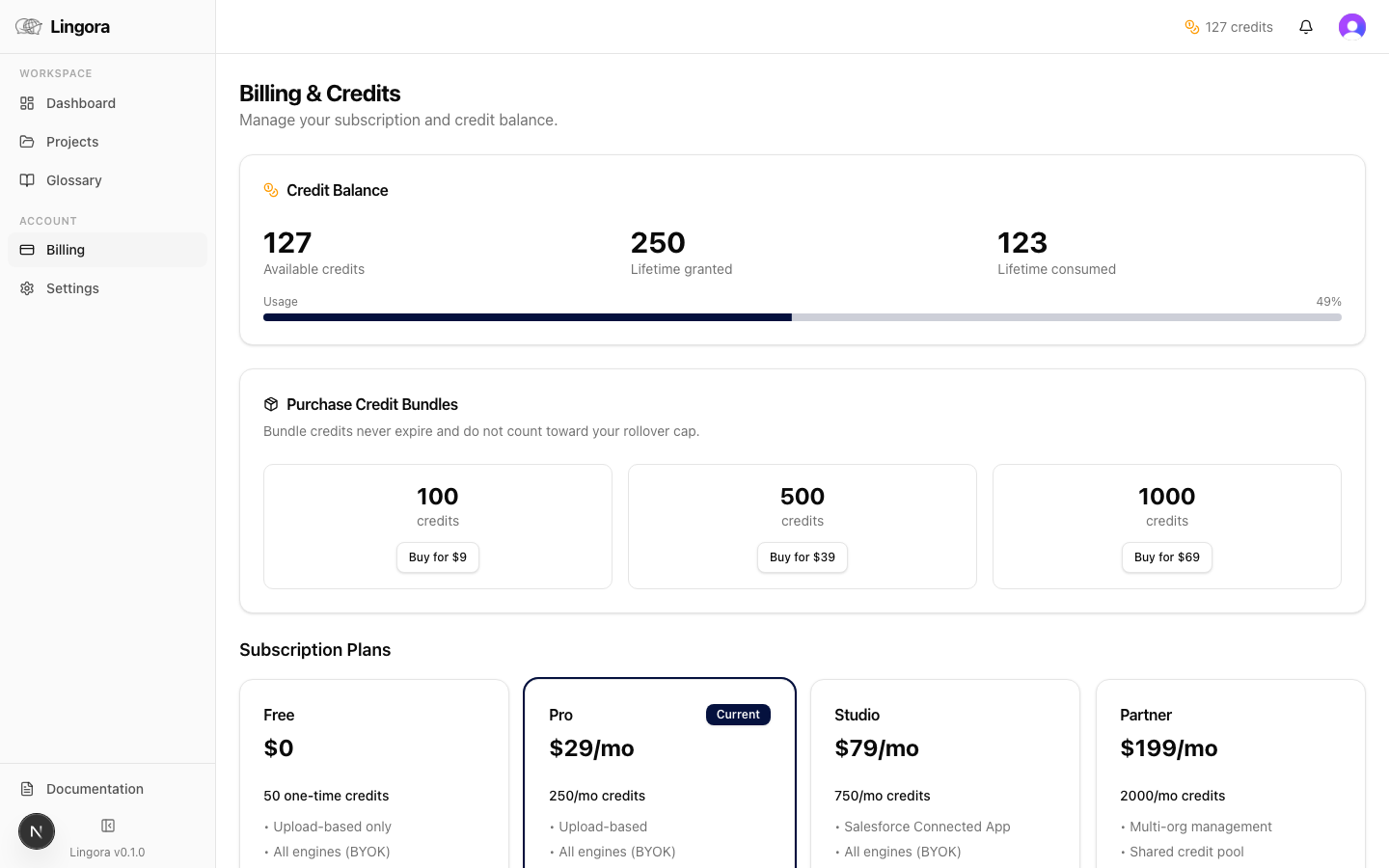
The Billing page gives you a full view of your credit position.
Credit Balance Card
The card at the top of the Billing page shows:
- Available credits — the balance you can spend right now
- Lifetime credits granted — total credits ever added to your account (subscription refreshes + one-time purchases)
- Lifetime credits consumed — total credits ever spent on translations
- Usage progress bar — visual indicator of consumed vs. granted credits for the current period
Low-Balance Indicators
Lingora surfaces credit warnings proactively so you are never caught off-guard mid-translation:
- Amber indicator in the header bar — appears when your available balance drops below 10 credits. Visible on every page.
- Zero-credit alert on the Billing page — shown when your balance hits 0. The Lingora LLM engine becomes unavailable for new translation jobs until credits are added.
If you reach zero credits, BYOK engines continue to work normally. Only the Lingora LLM engine is gated by credit balance.
Pricing Tiers
Lingora offers four subscription tiers. All prices are in USD.
| Tier | Monthly price | Monthly credits | Rollover cap | Key features |
|---|---|---|---|---|
| Free | $0 | 50 one-time (no refresh) | N/A | Upload-based workflow; all BYOK engines |
| Pro | $29/mo | 250/mo | 500 (1 month) | All engines; credit bundle purchases |
| Studio | $79/mo | 750/mo | 1,500 (2 months) | Salesforce Connected App; Knowledge Articles; 3 seats (+$10/seat); 1 org (+$25/org); team management |
| Partner | $199/mo | 2,000/mo | 6,000 (3 months) | Multi-org management; shared credit pool; white-label exports |
Monthly Credit Refresh
Monthly credits refresh on the 1st of each month for Pro, Studio, and Partner subscribers. Credits are added to your balance at midnight UTC.
Credit Rollover
Unused monthly credits roll over to the next month, up to the tier's rollover cap.
- Rollover is additive — credits accumulate month over month until the cap is reached.
- Rollover is not a hard reset — hitting the cap does not erase your existing balance; it simply stops additional accumulation until you spend down below the cap.
- Example (Studio tier, 1,500 cap): If you have 400 unused credits from last month and receive 750 new credits this month, your balance becomes 1,150 — well under the cap. If you had 900 unused credits, you would receive only 600 of the 750 new credits to avoid exceeding 1,500.
Free Tier
The Free tier grants 50 credits once, when your account is created, as a welcome gift. These credits do not refresh monthly. Once spent, you must upgrade to a paid tier or purchase a credit bundle (Pro and above) to continue using the Lingora LLM engine.
Free-tier users can still use BYOK engines indefinitely without credits.
Credit Bundles (One-Time Purchases)
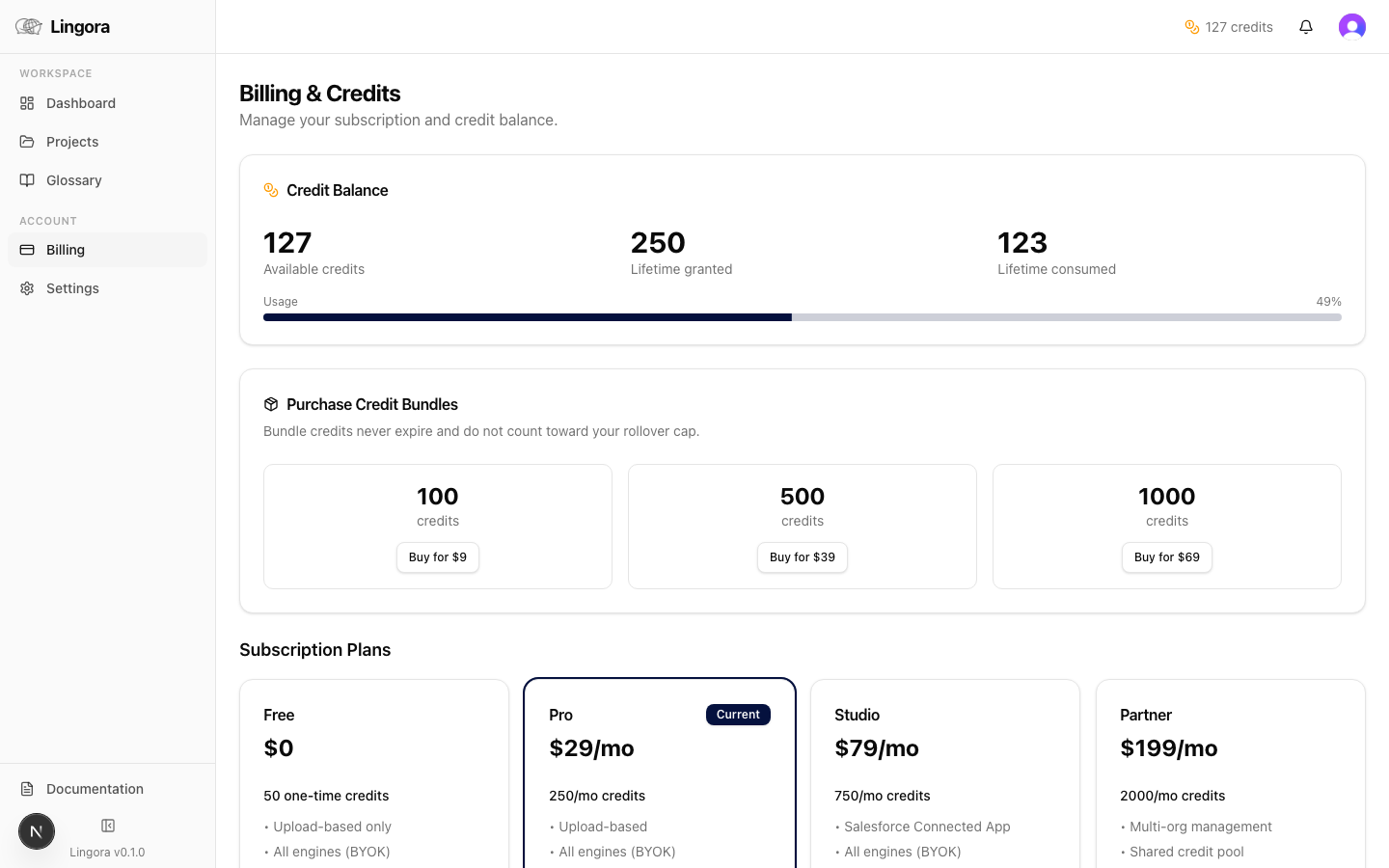
Credit bundles let you add credits to your account outside of the monthly subscription cycle. Bundle credits never expire and do not count toward your rollover cap — they are kept as a separate reserve.
| Bundle | Price | Credits |
|---|---|---|
| Starter | $9 | 100 credits |
| Growth | $39 | 500 credits |
| Scale | $69 | 1,000 credits |
Purchasing a Bundle
- On the Billing page, find the Credit Bundles section.
- Click the Buy button on the bundle you want.
- You are taken to a Stripe Checkout page. Complete payment.
- Credits are added to your balance immediately after payment is confirmed.
Purchases are processed via Stripe. Lingora does not store your payment card details.
Availability: Credit bundles are available to Pro, Studio, and Partner subscribers only. Free-tier users cannot purchase bundles — upgrade to a paid plan first.
Managing Your Subscription
Upgrading
- On the Billing page, find the tier card you want to move to.
- Click the Upgrade button on that card.
- Complete the Stripe Checkout flow.
On upgrade, the prorated monthly credit allocation for the new tier is granted to your account immediately. You do not have to wait for the next monthly refresh.
Downgrading
Downgrading takes effect at the end of your current billing period. Credits already granted to your account are not clawed back when you downgrade — you keep whatever balance you have.
Feature access (e.g., Salesforce Connected App on Studio) is removed at the start of the next billing period.
Managing Payment Method and Cancellation
- Click the Manage Subscription button on the Billing page.
- You are redirected to the Stripe Customer Portal, where you can:
- Update your payment method
- View past invoices
- Cancel your subscription
After cancellation, your account reverts to the Free tier at the end of the paid period.
Tips for Managing Credits Effectively
-
Use BYOK engines for high-volume, straightforward strings. If you are translating thousands of picklist values or short labels, route those resource types to DeepL or Google Translate in your engine routing settings. You pay your provider directly, and Lingora credits are preserved for the strings that truly benefit from AI-powered translation.
-
Reserve 3-candidate mode for complex strings. Generating three candidates costs three times as many credits as a single translation. Use it selectively for flow messages, validation rule text, and other strings where nuance matters — not for simple field labels.
-
Build your Translation Memory. Every approved translation in Lingora is stored in your Translation Memory. The next time a similar string appears (across any project), TM matches are applied for free. Over time, a healthy TM dramatically reduces credit consumption.
-
Watch the amber header indicator. The credit warning in the top navigation bar is visible everywhere in the app. Treat it as an early signal to purchase a bundle or review your engine routing before running a large translation job.
-
Check your rollover cap before month-end. If you are approaching the rollover cap, consider running a batch translation job to make use of credits before the new month's allocation arrives. Credits near the cap are forfeit if you cannot absorb them.